What's new in Swift Release 25 in May?
The May 2025 release brings you time-saving features and smarter automation.
Read on to discover the highlights of this release and unlock new possibilities for your app automation journey.
Swift Release 25 – May features the following capabilities:
Swift Agent: AI partner that transforms how you build enterprise solutions.
System Filters on Netsuite FBF: Reuse, customize, and create multiple filters for end users
Enhanced Grid Controls: Define conditional rules to make fields required or read-only, and set default values for any grid field.
So without further ado, let’s dive into the exciting new features we recently released!
Swift Agent - Your AI-Powered Automation Assistant
Swift Agent is an intelligent AI partner that helps you build apps and data models through simple conversation—unlike rigid automation tools, it understands your business, asks questions, and crafts solutions with you.
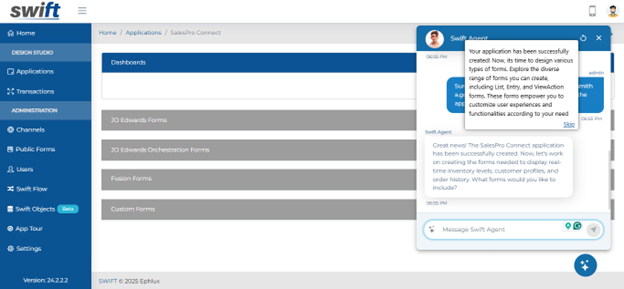
Why Swift Agent Is Different
Traditional tools follow commands. Swift agent understands your business and works with you to:
Understand your unique business context
Clarify requirements with smart questions
Suggest optimizations you might miss
Refine ideas together
Build End-to-End Solutions
Create a Swift object or build an app—describe your needs, and your AI partner will help design the perfect solution.
Agent for Swift Objects
Structuring data shouldn’t feel like solving a puzzle.
You: Create a Swift object for customer contracts with renewal tracking
The Swift Object Agent talks you through it:
Define object schemas: "Should we add loyalty tiers and purchase history?"
Establish relationships: "These product SKUs typically link to inventory records – want to connect them?"
Configure attributes: "This currency field should probably have validation rules – need help setting them up?"
It’s like brainstorming with an expert, minus the meetings.
Agent for Apps & Forms
This is your go-to for turning ideas into working solutions fast.
You: Build an inventory management app with barcode scanning
The Swift Agent talks you through it:
Natural Language to App – Describe your requirements (e.g., “a customer feedback form with priority tagging”), and the agent drafts the app structure.
Smart Workflow Suggestions – The AI recommends automation triggers, user roles, and integrations based on best practices.
Multi-Platform Ready – Generate mobile apps, web portals, or workflows swiftly.
No more guessing requirements—the agent helps you think ahead.
Let’s Be Honest - We've all suffered through clunky "AI helpers" that create more work than they save.
Finally, an AI that asks the right questions before building the real-time apps.
System Filters on NetSuite FBF
NetSuite’s FnB forms now support System Filters, letting you customize data retrieval and presentation by creating or adjusting filters for better control
What can you do?
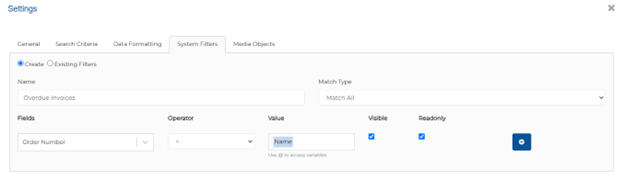
Name: Assign a distinct identifier for easy recognition.
Match Type: Opt for precision with options like 'Match Any' or ‘Match All’.
Field Selection: Handpick specific JD Edwards fields for targeting.
Operators: Define operations like 'Equals' or 'Contains' for precise filtering.
Values: Input parameters for field comparison. You can use @ for dynamic values.
Visibility: Choose whether a user can visible the filter.
Read-Only Mode: Decide if users can modify the filter post-application.
Manage filters via Existing Filters, then access them in the app's dropdown next to the search icon.
Enhanced Grid Controls
We’ve added two small but mighty upgrades to give you more control in grid view fields:
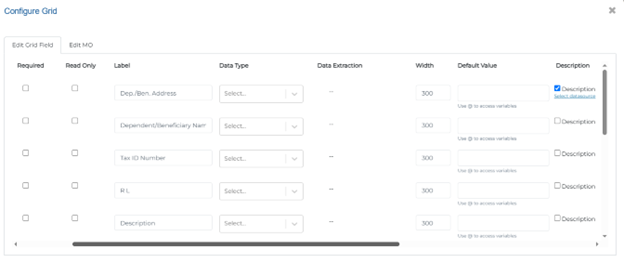
Conditional Required & Read-Only Fields
Now you can make grid fields required or read-only based on dynamic conditions.
Required Fields – Force mandatory inputs only when certain rules apply
Read-Only Fields – Lock down fields automatically based on your criteria
Flexible Logic – Set conditions using other field values or system states
Example: Make the "Approver Notes" field required only when status = "Rejected."
Default Values at Grid Level
You can now save time with Pre-fill fields automatically.
Set defaults – Define starting values for any field
Applies across the entire grid
Editable – Users can still modify if needed
Example: Set "Department" to “IT” by default.
Wrapping Up
That wraps up our latest updates to Swift!
These updates are designed to save you clicks, reduce repetitive work, and help you focus on what matters most.
📌 Pro Tip: Combine Swift Agents + Filters + Grid Rules for end-to-end workflow efficiency.
Stay tuned for more innovations, and as always, happy designing with Swift!
Thank you for being a part of the Swift community. Here's to optimizing your processes and achieving success!
With 💙 from Swift
Your feedback is essential in driving us forward, so please don't hesitate to share your thoughts with us; and stay tuned for more groundbreaking features as we evolve!