What's new in Swift Release 26 in June?
The June 2026 release focuses on enhancing platform usability, design flexibility, AI-assisted experiences, and automation across the Swift ecosystem.
Read on to discover the highlights of this release and unlock new possibilities for your app automation journey.
Swift Release 26 – June features the following capabilities:
The Swift Evolution: A complete platform-wide refresh delivering a faster, more intuitive, and unified experience across Swift.
Enhanced Panel Styling: Greater control over panel design with advanced styling, layout customization, and interactive behaviors.
Agents for Public Forms: Bring AI-powered assistance directly into public forms for smarter user guidance and data exploration.
Enhanced Form Designer Flexibility: Design forms with complete layout freedom while retaining the ability to instantly restore structure.
Automated Schema Import: Import CSV or Excel files to automatically generate objects, applications, and data schemas in minutes.
So without further ado, let’s dive into the exciting new features we recently released!
The Swift Evolution
This release introduces structural changes to the Swift user interface and core navigation, alongside new utility tools designed to centralize administration and development tasks.
The Fully Revamped Next-Gen Interface
The entire workspace has been reengineered into a cohesive micro-frontend experience. This full UI transformation brings unprecedented fluidity to every development and administration workflow:
High-Contrast Dashboard Cards: Upgraded the primary landing metrics into a clean container layout that surfaces real-time counts for active Applications, Agents, Workflows, and Users with strict tracking states.
Three-Pane Application Designer: A unified configuration canvas that splits workspace layouts logically, such as managing data primitive selectors, deep grid mapping fields, or specific logic structures.
Advanced Analytics Visualization: High-performance, embedded telemetry dashboards within Swift Flow that render visual execution timelines, multi-colored distribution pies for transaction shares, and average processing latency charts.
White-Label Branding Interfaces: Personalized admin configurations allowing organizations to map distinct assets, embed portal video components, control text/button hexadecimal color matching, and custom-brand the Swift Mobile App authentication screen.
Every corner of the platform has been optimized, from more granular status tracking and versioning to execution auditing, creating a unified, high-performance ecosystem that makes managing AI agents, data schemas, and complex automations faster and more accessible than ever before.
Enhanced Panel Styling
The Panel control has undergone a significant visual and functional upgrade, offering unparalleled flexibility for personalizing and styling application layouts to meet specific branding and usability needs.
Designers can now fully customize panel aesthetics, flexible layouts, and interactive behavior with advanced Card Style controls, enhanced headers, and conditional visibility options.
Agents for Public Forms
The platform now supports AI agent integration in Public Forms, providing real-time assistance and enhanced data exploration as users interact with form content.
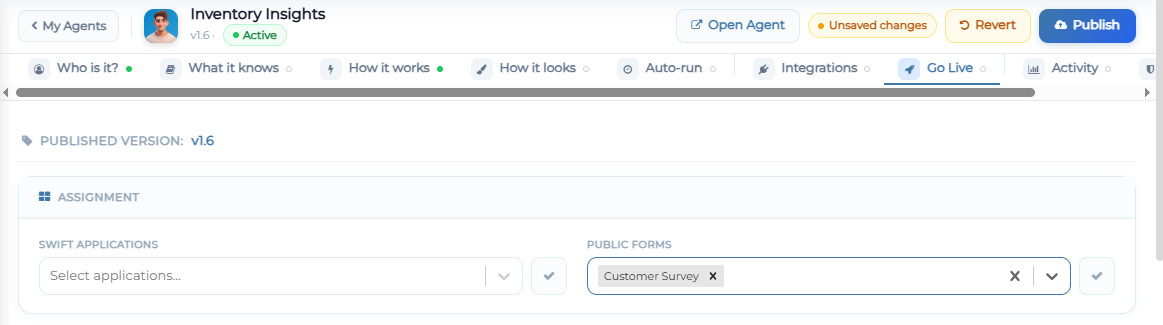
Through the updated Go Live configuration in Agent Studio, admins can assign an agent to specific public forms and choose between a docked overlay or full-screen experience.
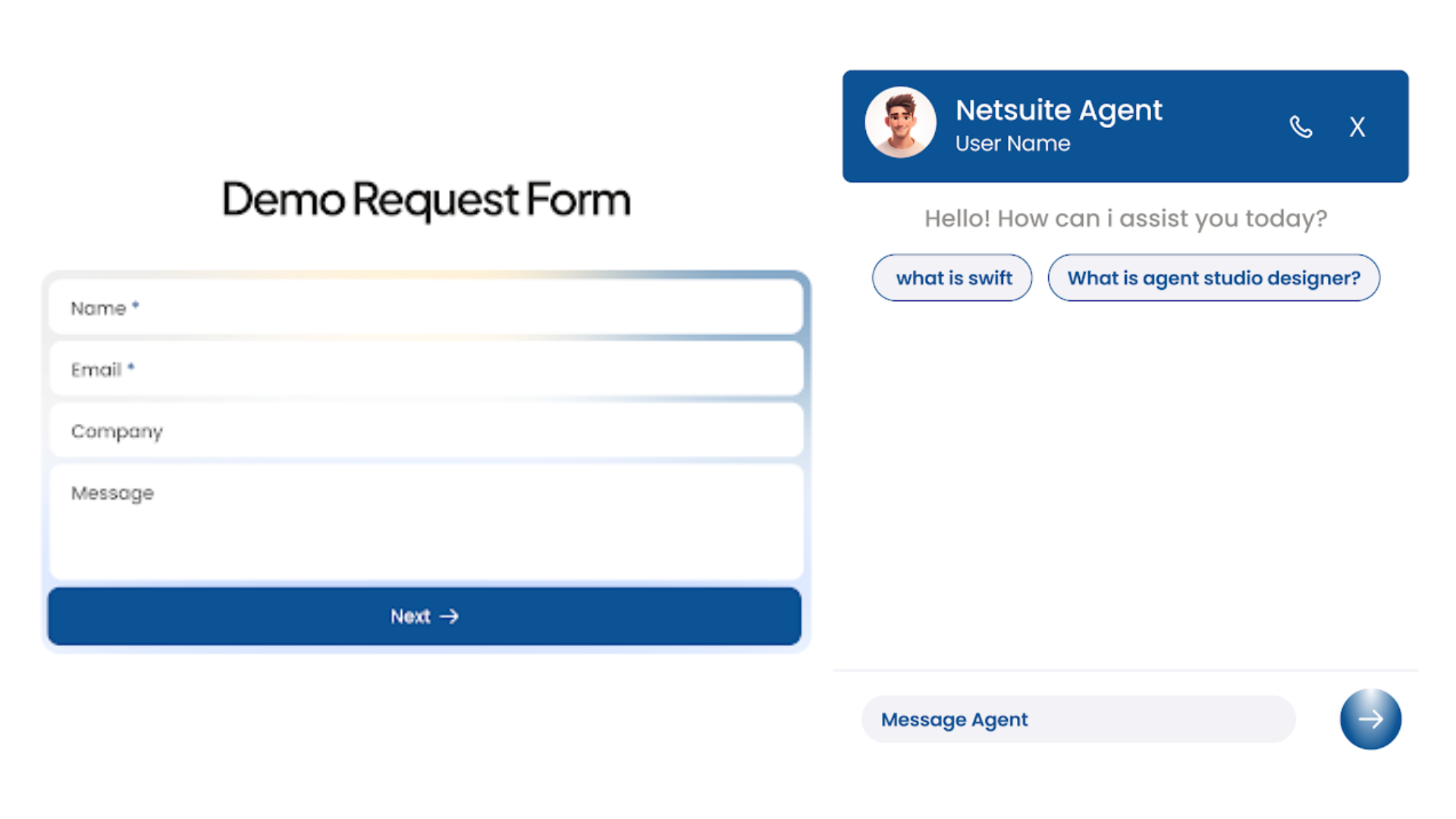
This functionality enables agents to interpret context, helping users navigate complex fields and providing instant insights to streamline the submission process.
Enhanced Form Designer Flexibility
The Form Designer’s drag-and-drop engine has been upgraded to provide greater layout freedom, allowing users to place controls at any position on the design canvas for a completely customized interface.
To balance this flexibility with structural precision, a new reset functionality has been introduced, enabling designers to instantly realign and restore all controls to a standard, orderly sequence with a single click.
Automated Schema Import
The data modeling process is now significantly faster with the ability to import Swift Object structures directly from CSV or Excel files.
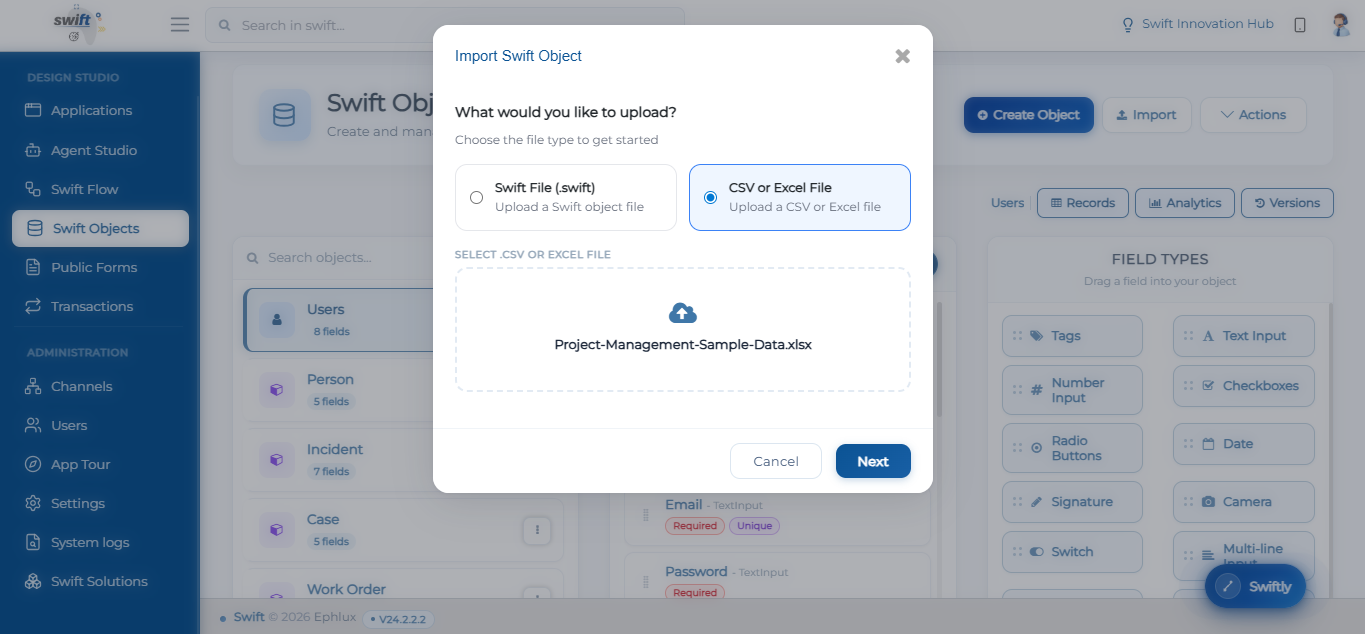
This automated workflow not only generates the target object but also creates the associated application simultaneously, streamlining the end-to-end setup process.
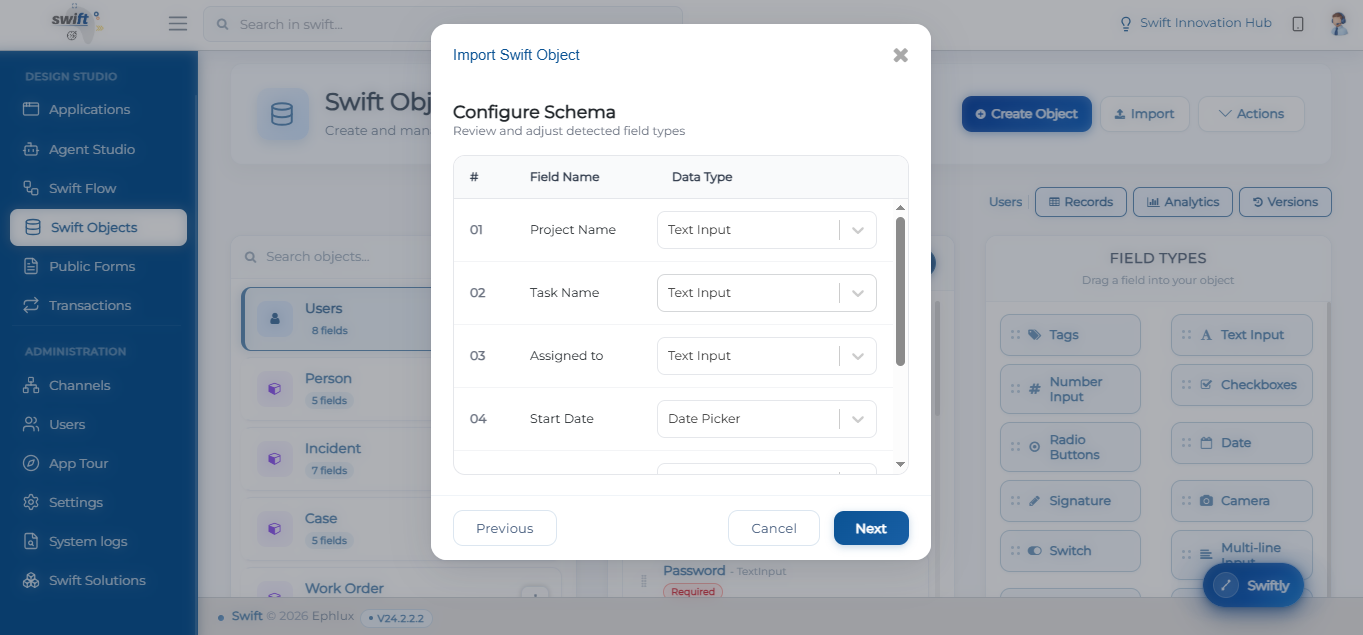
Upon upload, a new Configure Schema interface allows designers to review detected headers and assign precise data types such as Text Inputs, Date Pickers, or Number Inputs, ensuring the resulting object structure is accurately aligned with the source data before final creation.
Wrapping Up
That concludes the June 2026 release highlights.
This update strengthens the Swift platform with a modernized user experience, greater design flexibility, AI-powered assistance, and faster application setup through automation. From the platform-wide UI refresh and enhanced panel customization to public form agents and automated schema imports, these improvements are designed to help teams build, manage, and scale enterprise applications more efficiently.
📌 Pro Tip: Use Automated Schema Import to rapidly transform spreadsheet data into fully functional applications, then leverage AI Agents in Public Forms to guide users through data collection and exploration with contextual assistance.
Stay tuned for more innovations, and as always, happy designing with Swift!
Thank you for being a part of the Swift community. Here's to optimizing your processes and achieving success!
With 💙 from Swift
Your feedback is essential in driving us forward, so please don't hesitate to share your thoughts with us, and stay tuned for more groundbreaking features as we evolve!