What's new in Swift Release 25 in April?
The April 2025 release brings key enhancements to Swift, making it easier to refresh dashboards, manage scanned items, trigger custom actions, and create more precise conditions.
Read on to discover the highlights of this release and unlock new possibilities for your app automation journey.
Swift Release 25 – April features the following capabilities:
Dashboard Refresh Button Toggle: Quickly refresh your dashboard with a single click.
Grouping Based on Scan: Group and manage scanned items with duplicate filtering and customizable alerts.
Data Type Support in Conditions: Use explicit data types for more accurate and reliable conditions.
Conditional Execution of Custom Button: Trigger custom button actions only when specific conditions are met.
So without further ado, let’s dive into the exciting new features we recently released!
Dashboard Refresh Button Toggle
End users can now refresh all KPI widgets and other components at once—no more reloading the whole page.
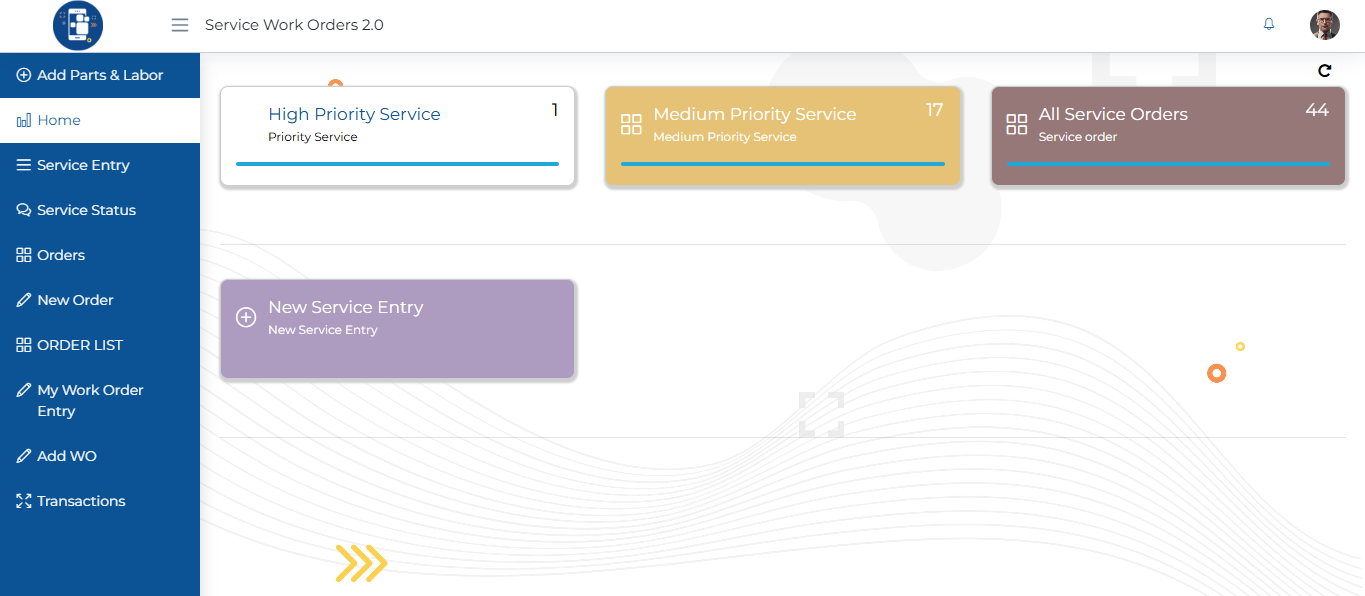
To turn it on
Click the pencil (edit) icon on the dashboard.
It will open up the settings panel.
Enable the Show Refresh Button option.
Submit it.
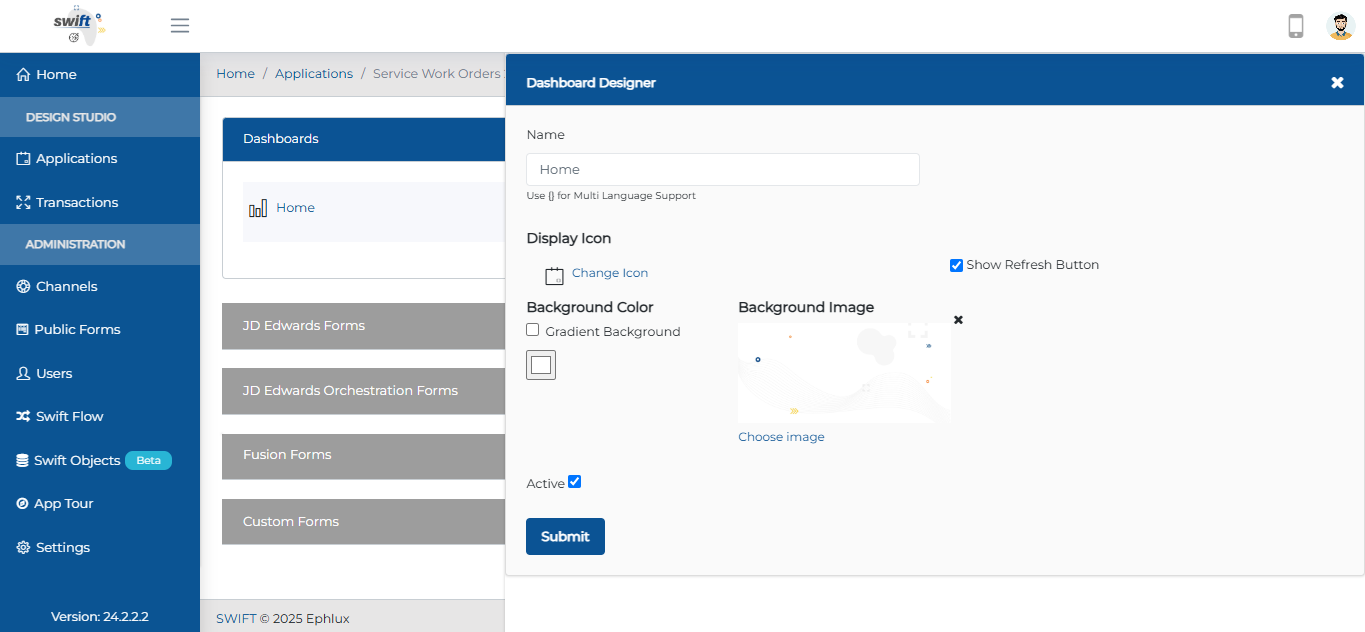
That’s it!
Enjoy a faster, smoother way to keep your data fresh—just the way it should be.
Grouping Based on Scan
We've enhanced barcode/QR code scanning in entry forms and view actions with smart data grouping and flexible update rules. Now, Designers can configure exactly how scanned data merges with existing records through a simple UI panel by using the “Scanned Data Filtration" option.
Key Control
Tracking Fields: Select which field identifies items for grouping (e.g., Order Date)
Updating Fields: Choose which fields get populated by new scans (e.g., Start Date)
Operation Modes: Overwrite existing grouped items (Replace) or Append to existing quantities/values (Add).
To set this up
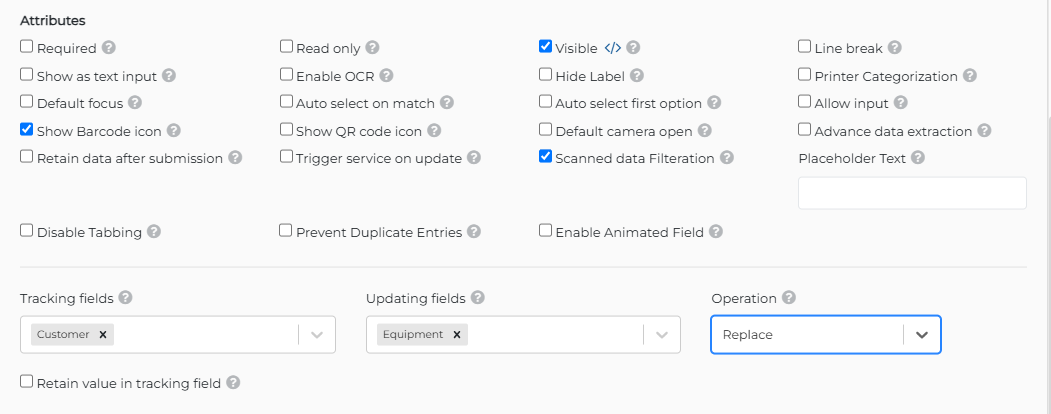
Add a barcode field to your form
Click the settings icon to open the scan configuration panel (as shown)
Set your tracking field, update rules, and operation mode
Scans now will automatically group and update based on your logic.
This enhancement ensures better data handling, reduces interface clutter, and improves the efficiency of repetitive or bulk scans.
Data Type Support in Conditions
Conditions now support explicit data types (e.g., String, Boolean, Numeric) for more accurate and reliable rule configuration across apps.
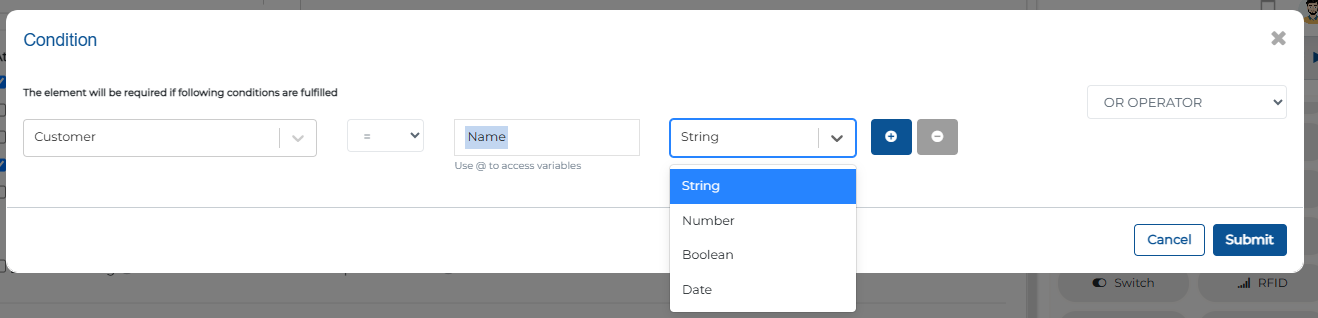
Here’s how to use it:
Head to a view action or entry form, click the </> icon against (Required, Visible, etc) options to open the condition builder.
Select a variable and assign its data type (String, Boolean, etc.) to define precise logic.
This update makes condition logic more robust and reliable across your apps.
Conditional Execution for Custom Buttons
Custom buttons now support conditional execution—actions will only trigger if specified conditions are met.
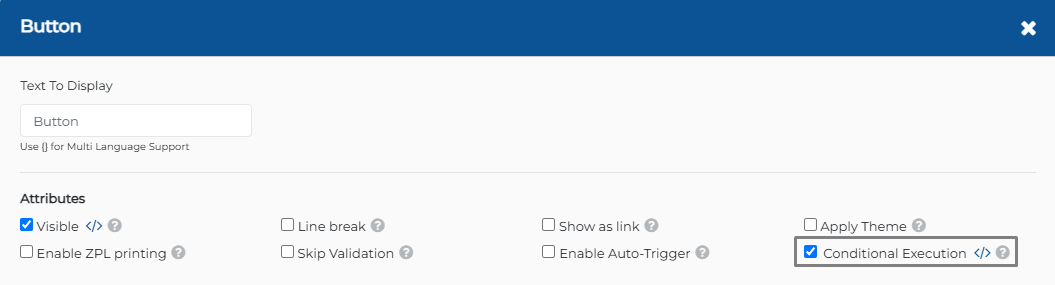
Set it up like this

Set Conditions: Specify when the Action button should perform its function.
Select the field from the dropdown where the condition applies.
Example: If the "Department" field equals "Tech Depart", the Action button will proceed.
Use variables (prefixed with @) and choose appropriate data types (String, Boolean, Numeric) to build your condition logic.
Configure Feedback: If the condition is not met, select message severity from dropdown (ERROR or WARNING) and enter tailored text (e.g., "ERROR: Complete all fields first").
Save Customization: Click Submit to apply conditions.
Wrapping Up
That wraps up our latest updates to Swift!
Now, you can refresh your dashboard with a single click, group and manage scanned items more effectively, trigger actions with custom buttons based on conditions, and fine-tune your conditions using explicit data types for better precision.
These updates are all about improving efficiency, accuracy, and ease of use.
Stay tuned for more innovations, and as always, happy designing with Swift!
Thank you for being a part of the Swift community. Here's to optimizing your processes and achieving success!
With 💙 from Swift
Your feedback is essential in driving us forward, so please don't hesitate to share your thoughts with us; and stay tuned for more groundbreaking features as we evolve!