What's new in Swift Release 26 in September?
The September 2026 release focuses on Advanced Workflow Automation, Structured Workspace Organization, Enhanced E-Commerce Experiences, AI-Driven Workflow Integration via MCP and Next-Generation Data Visualization.
Read on to discover the highlights of this release and unlock new possibilities for your app automation journey.
Swift Release 26 – September features the following capabilities:
New Advanced Workflow Nodes: Merge, Loop, Call Workflow, Transform, and Human Action nodes for complex logic.
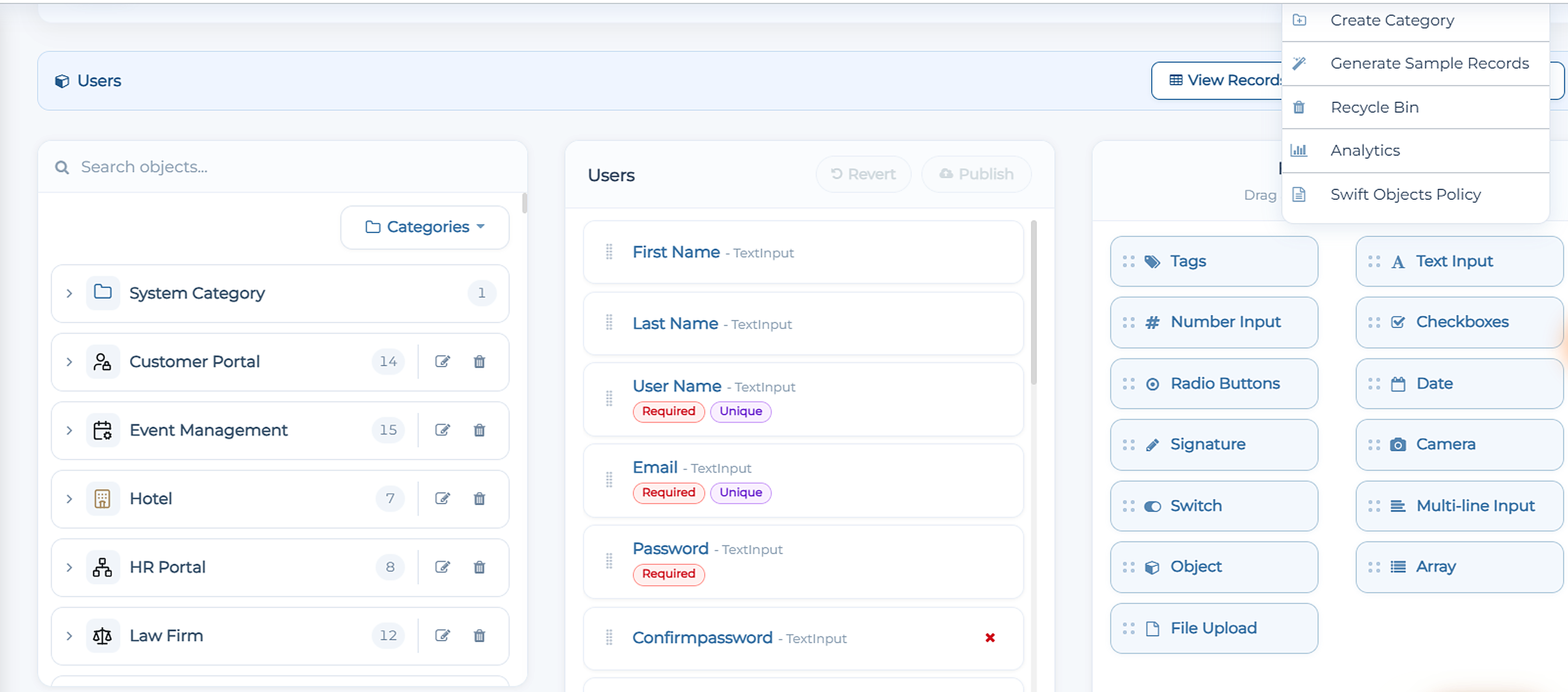
Unified Object & Workflow Categorization: Group Swift Objects and Workflows into dedicated categories for effortless access.
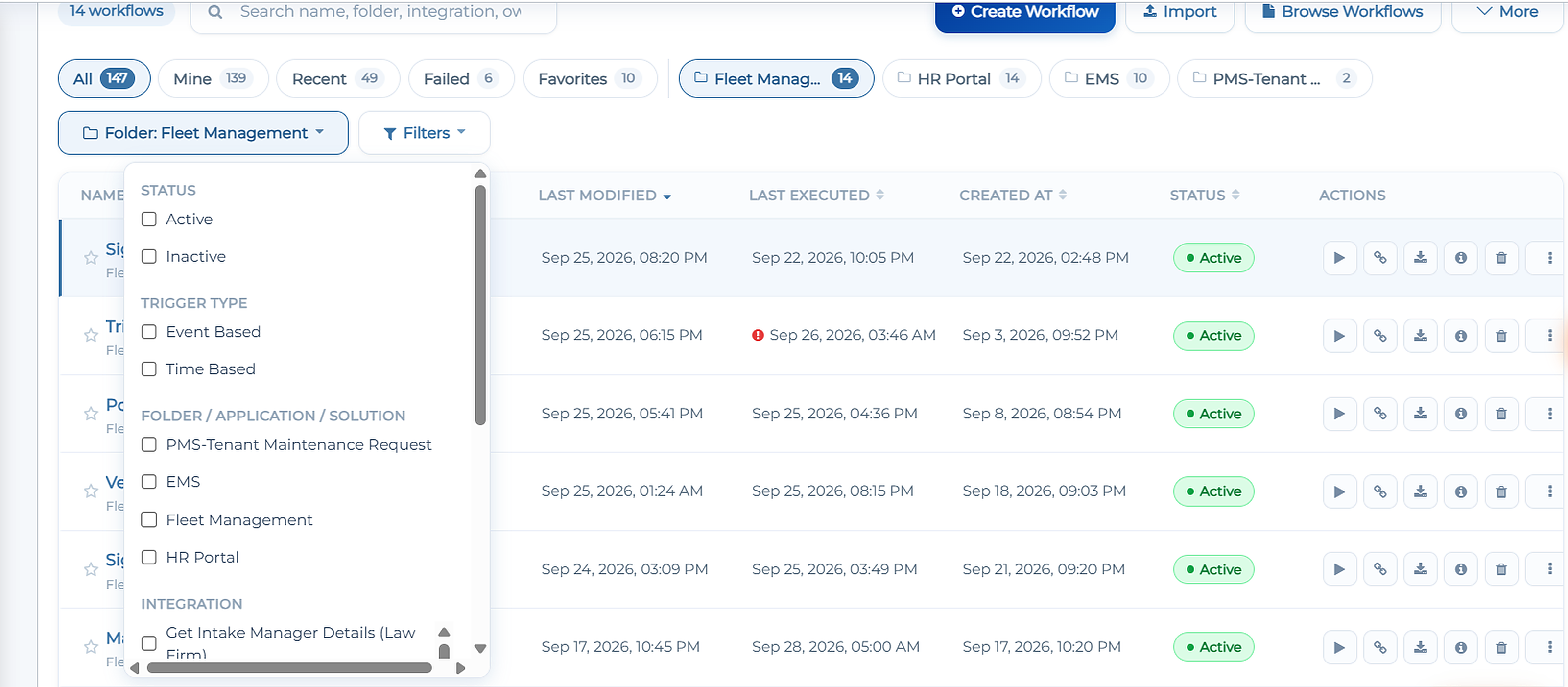
Advanced Workflows Filter: Filter workflows instantly by status, category, date, trigger type, and integration.
Real-Time Chart & Widget Data Fetching: Configurable refresh intervals keep end-user dashboards automatically up to date.
Enhanced E-commerce Storefront Control: Build configurable catalog, cart, and checkout workflows directly using Swift Objects or connected systems.
MCP Support for Workflows: Expose Swift workflows directly to external AI tools (like Claude and ChatGPT) as executable MCP actions.
Next-Gen Visualizations & Chart Themes: Expanded chart library with ready-made layouts, auto-field mapping, and new visual themes.
So without further ado, let’s dive into the exciting new features we recently released!
New Advanced Workflow Nodes
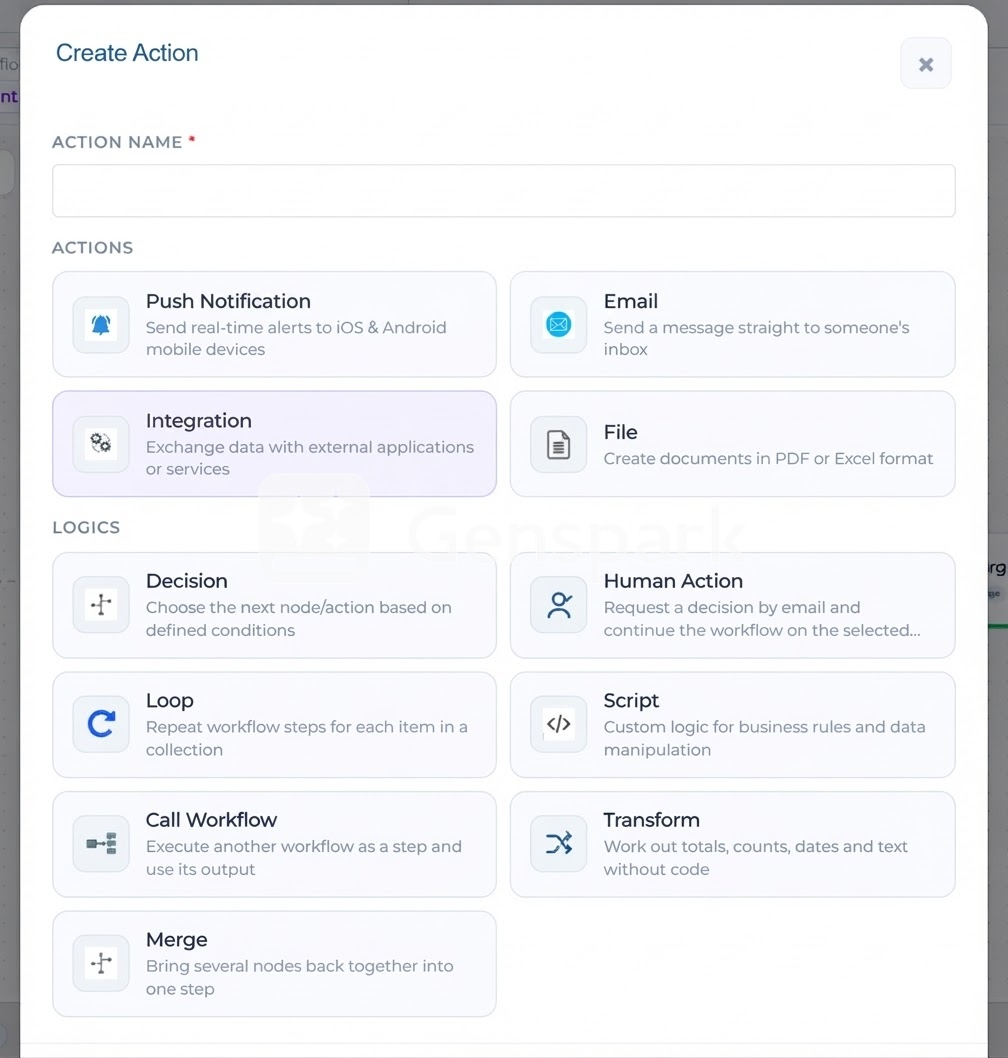
Building multi-branch, dynamic business logic is now faster and cleaner with five powerful new logic actions added to the Workflow Designer:
Merge: Unifies responses from multiple parallel execution branches into a single downstream step.
Loop: Iterates over arrays or collections to execute repetitive workflow steps automatically.
Call Workflow: Invokes another existing workflow as a nested step and passes its output forward.
Transform: Calculates totals, formats dates, and manipulates text directly without writing code or scripts.
Human Action: Triggers interactive email approval requests and routes the workflow path based on the user's decision.
Unified Object & Workflow Categorization
Keep growing enterprise solutions structured and easily navigable across teams:
Category Assignment: Organize Swift Objects and Workflows into custom categories (e.g., Fleet Management, HR Portal, Law Firm) for quick access. Click Create Category to make one suitable for your use case.
Advanced Workflows Filter: Quickly isolate workflows using multi-select filters for Status (Active, Inactive), Trigger Type (Event-Based, Time-Based), Category/Folder, and Integration.
Real-Time Chart & Widget Data Fetching
Ensure end users always see up-to-second metrics without requiring manual page refreshes.
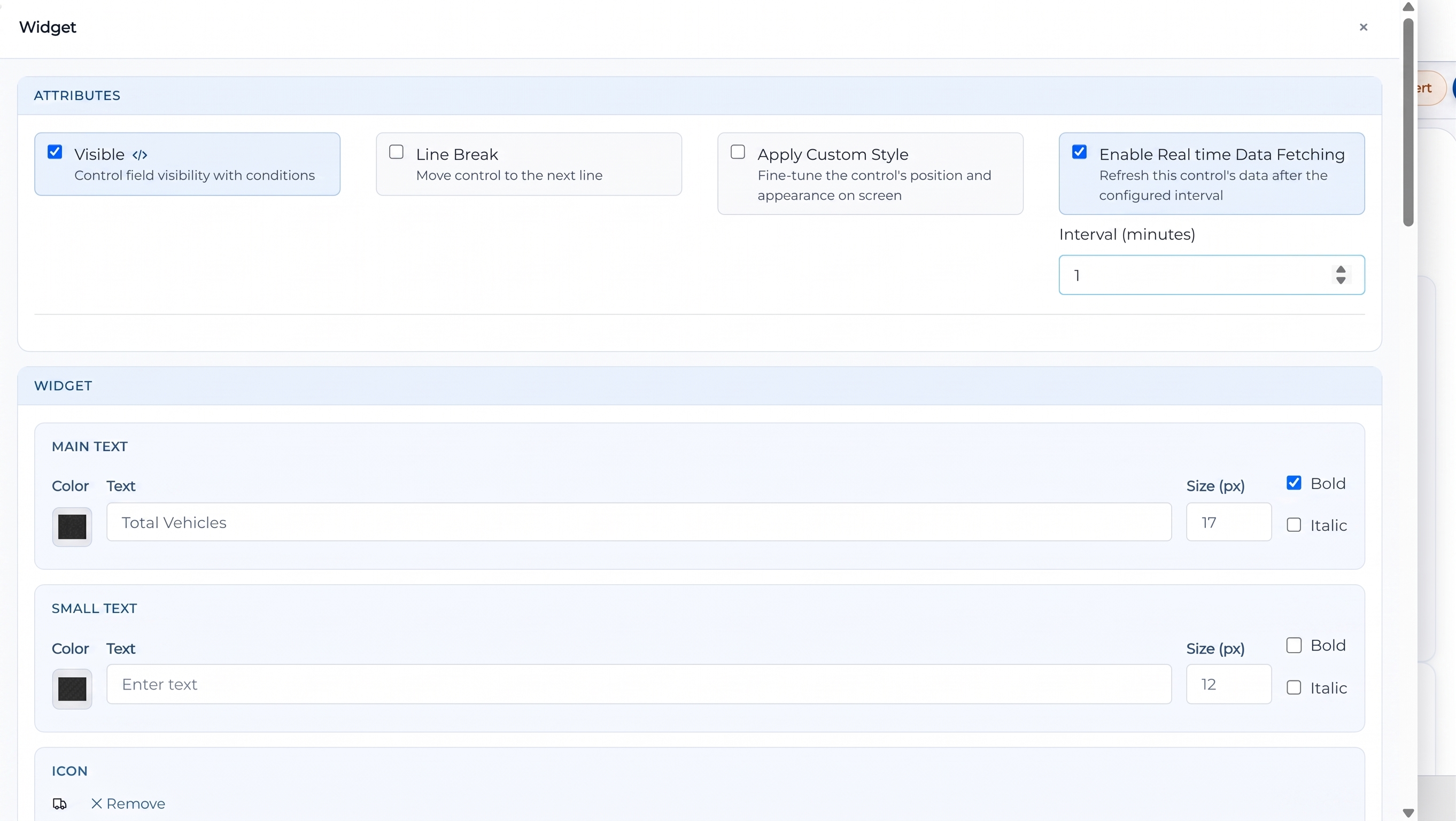
Interval Refresh: Enable Real-time Data Fetching on Widgets and Charts, setting custom update intervals (e.g., every 1 minute) to keep live figures continuously synced.
Enhanced E-commerce Storefront Control
Building and embedding a customer-facing e-commerce store is now available as a fully configurable, multi-step component directly within the Swift App Designer.
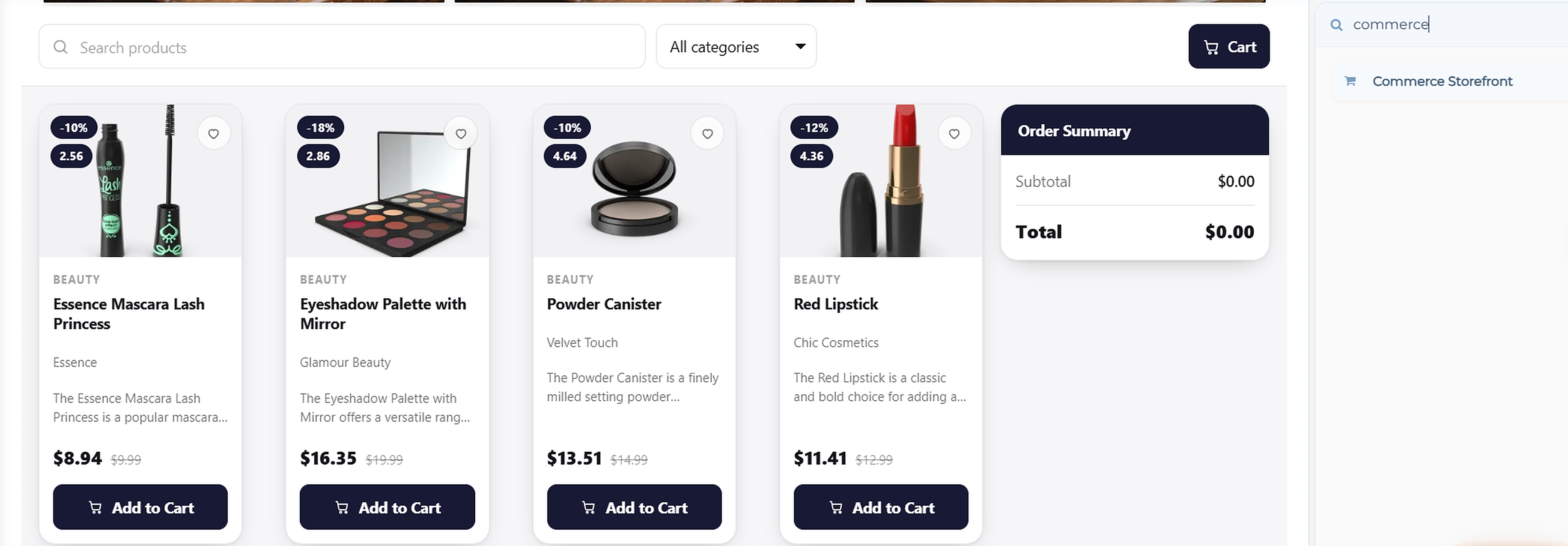
Multi-Step Configuration Setup: Follow a guided setup tracker across six core phases: Connect Data, Design Storefront, Search & Filter, Cart & Checkout, Payment, and Post-Order Action.
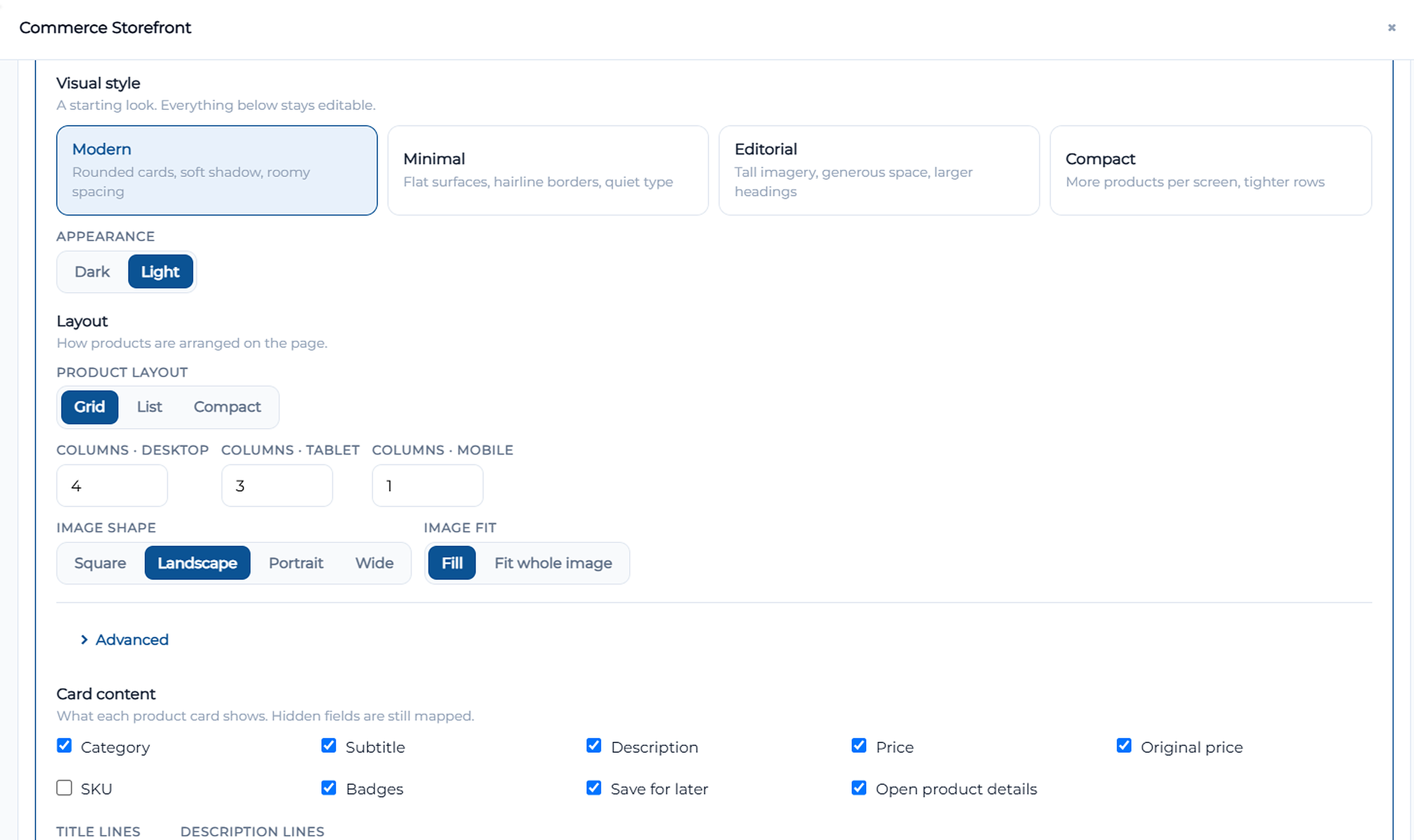
Responsive Layouts & Card Design: Custom column counts for Desktop, Tablet, and Mobile with options for Grid, List, or Compact arrangements. Toggles allow fine-tuned control over card content (Category, Price, SKU, Badges, Save for later) and image fitting.
Multi-Device Cart & Checkout: Personalize cart behaviors (Centred dialog, Side drawer, Bottom sheet), toggle checkout steps (Shipping, Billing, Review, Payment), and customize all action wording.
MCP Support for Workflows
Connect your Swift workflows directly to external AI models and assistants using the Model Context Protocol (MCP) standard
Settings → MCP
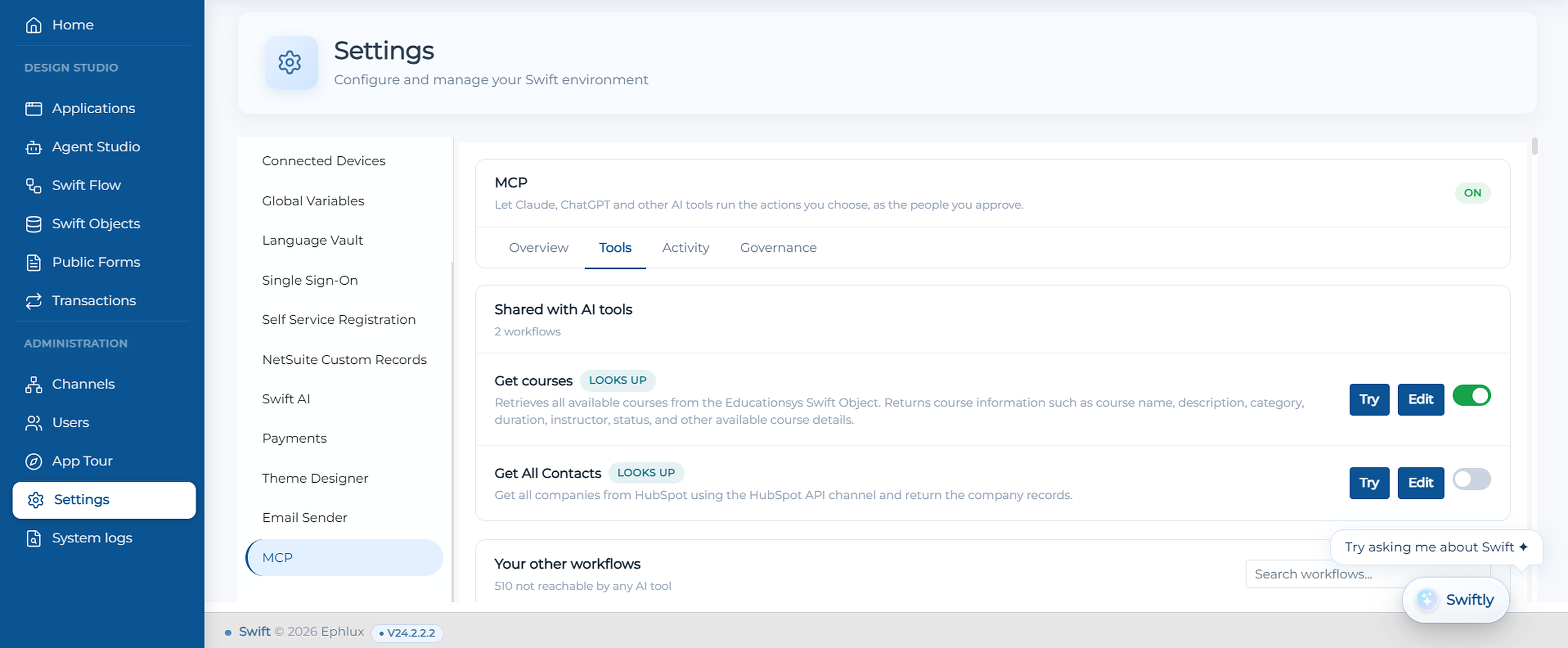
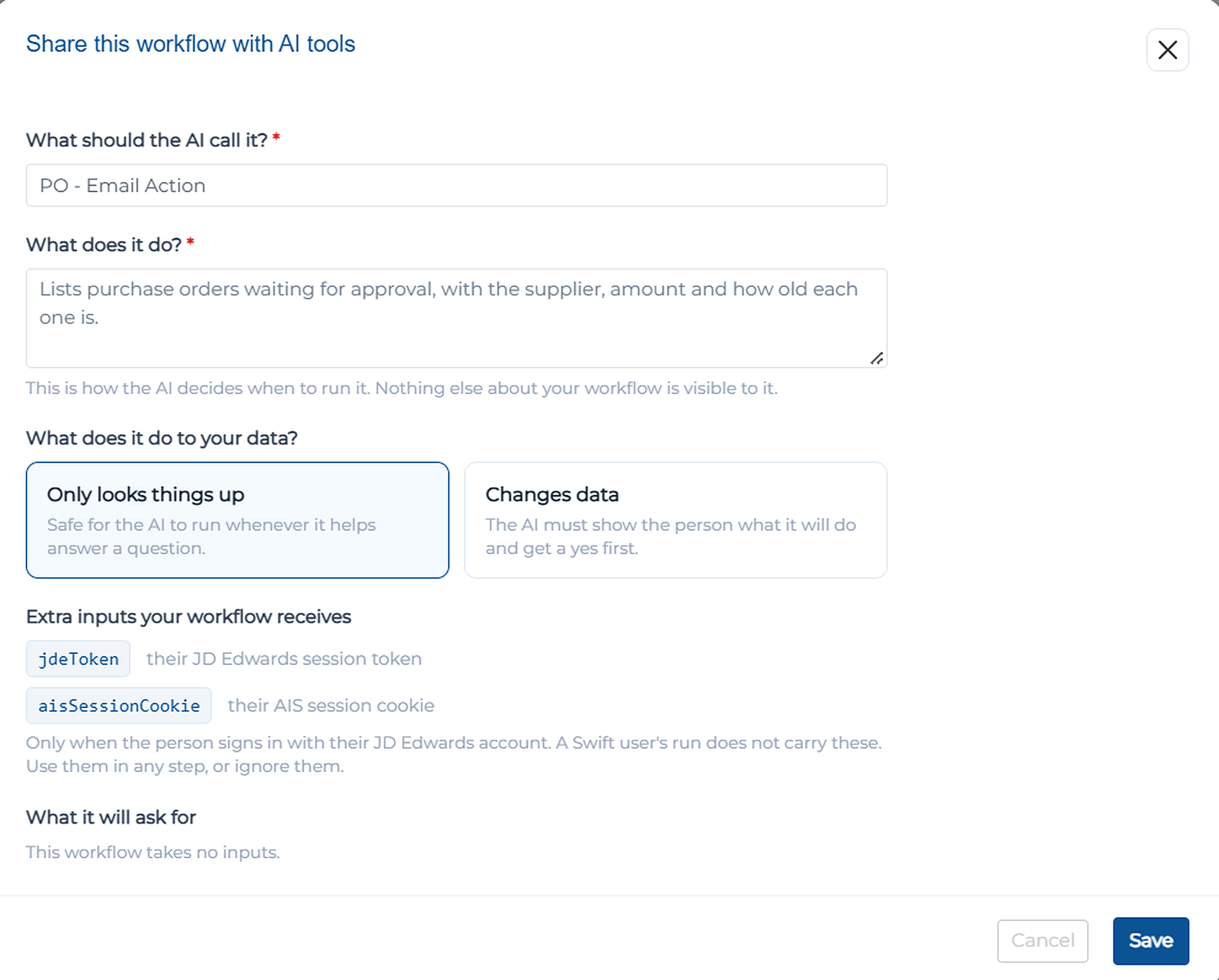
Seamless AI Sharing: Click Share on any workflow to expose it as an executable MCP tool, allowing models like Claude or ChatGPT to run your workflow on demand.
AI Tool Configuration: Define clear titles, custom descriptions, and intent declarations (e.g., "Only looks things up" vs. "Changes data") so the AI knows exactly when and safely how to invoke the workflow.
Token & Session Context: Pass extra runtime inputs—such as JD Edwards session tokens (jdeToken) or AIS cookies (aisSessionCookie)—directly into workflow executions.
Centralized Governance & Activity Audit: Enable or disable the account-level MCP server, control user connection access, and view real-time audit logs of actions executed by external AI tools.
Next-Gen Visualizations & Chart Themes
Transform raw data into meaningful executive insights using an expanded suite of visual controls.
Comprehensive Chart Types: Includes Column, Bar, Stacked 100%, Radar, Line, Area, Combo, KPI Trend, Pie, Donut, Treemap, Funnel, Polar, Heatmap, Range, Scatter, and Bubble charts.
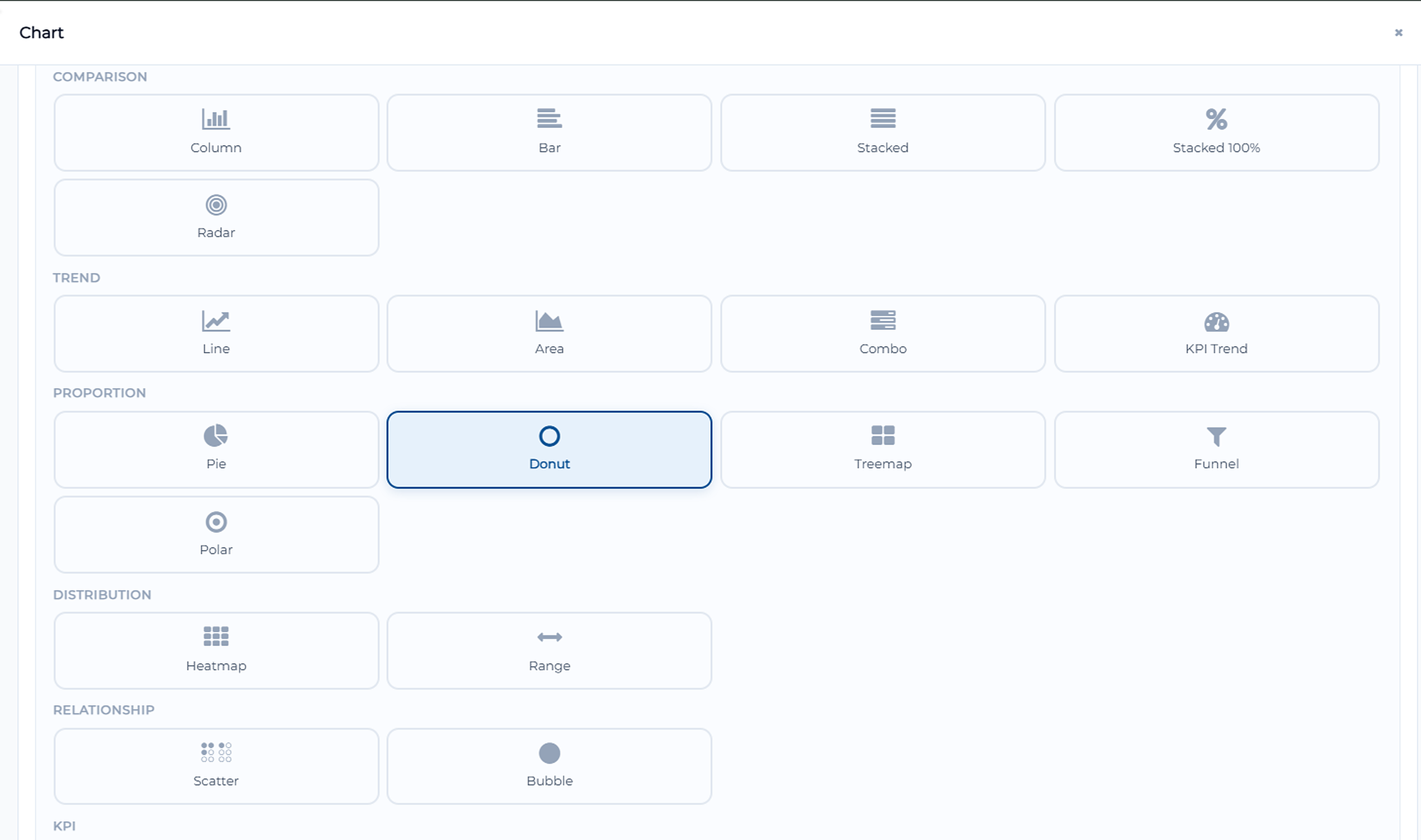
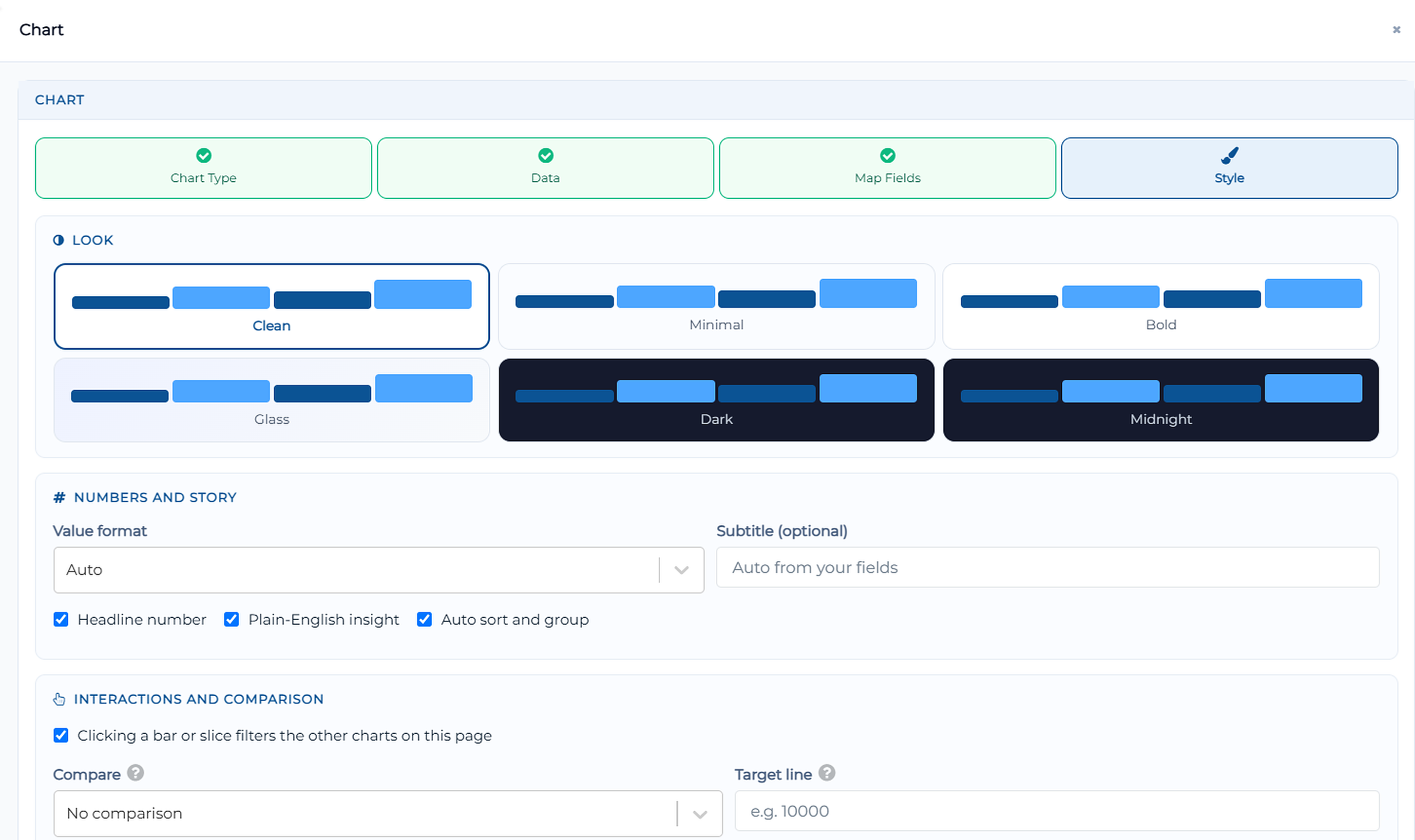
Ready-Made Chart Layouts & Auto-Mapping: Automatically detects data fields and suggests instant visual tiles or maps axes with one click.
Advanced Visual Styling: Personalize charts with visual themes (Clean, Minimal, Bold, Glass, Dark, Midnight) and enhance storytelling with plain-English insights, headline summary numbers, and target line comparisons.
Wrapping Up
That concludes the September 2026 release highlights.
This release bridges the gap between enterprise workflows and conversational AI through standard MCP integration, while equipping creators with powerful customer-facing storefront tools and sophisticated workflow control nodes like looping, merging, and email approvals. Combined with robust folder organization, real-time dashboard syncing, and an expanded suite of customizable chart styles, Swift continues to make enterprise automation faster, smarter, and visually stunning.
📌 Pro Tip: Set up an E-commerce Storefront Control for your catalog, pair it with a Human Action workflow node to request manager approval for high-value purchases, and track live sales progress using an auto-refreshing KPI Trend chart!
Stay tuned for more innovations, and as always, happy designing with Swift!
Thank you for being a part of the Swift community. Here's to optimizing your processes and achieving success!
With 💙 from Swift
Your feedback is essential in driving us forward, so please don't hesitate to share your thoughts with us, and stay tuned for more groundbreaking features as we evolve!