What's new in Swift Release 25 in February?
The Feb 2025 release brings key updates to simplify automation, improve workflows, and offer more customization—helping you work faster and more efficiently.
Get ready for a more robust, efficient, and enjoyable automation journey.
Swift Release 25 – February features the following capabilities:
Sticky Notes for Dashboards: A convenient and customizable way to take notes and organize information, with easy removal when no longer needed.
Dynamic Iframe: Integrate dynamic content in Iframes with user-specific parameters for a personalized experience.
Admins Can Manage BA Users: Directly create and manage Business Analyst users.
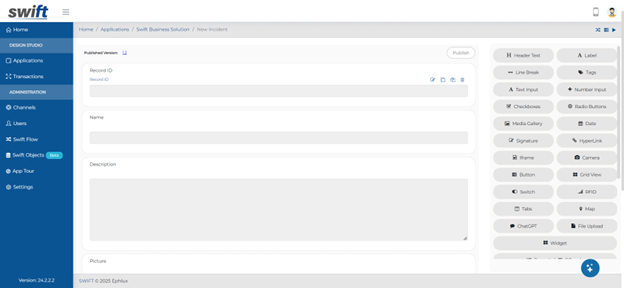
Revamped Entry form designer: Enhanced with a sleek, modern circular background for a more cohesive and visually appealing user experience.
So without further ado, let’s dive into the exciting new features we recently released!
Sticky Notes for Dashboards
Business Analysts can now add sticky notes to dashboards for end users, providing a simple and effective way to keep important reminders and notes front and center. These sticky notes are easily customizable in terms of size, style, and content—and can be removed with a single click when they’re no longer needed.
How to add Sticky Notes:
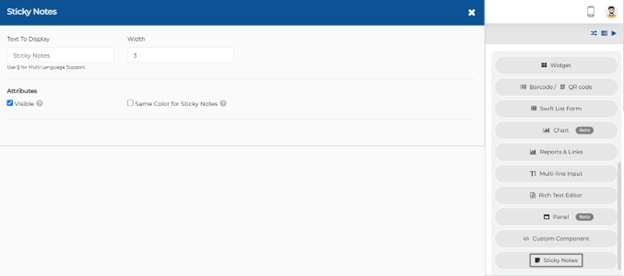
Open the app where you want to add sticky notes.
Go to your dashboard section.
Pick the Sticky Note component from the list of available components.
Drag and drop the Sticky Note into your dashboard.
Customize your sticky note – adjust the name, size, and style to fit your needs.
Once customized, the sticky note will automatically display on the dashboard for end-users.
End-User Experience
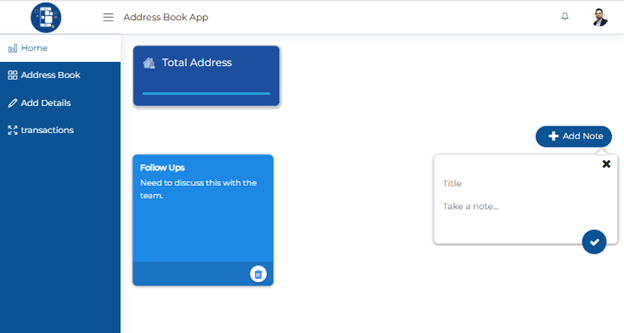
This will let you add personalized, flexible sticky notes right to your app’s dashboard – perfect for jotting down quick reminders or important notes.
Dynamic Iframe
With this release, business analysts can now use Iframe with variable mapping, user attributes, or global variables to pass dynamic parameters within their apps. This feature makes it easy to integrate external content like videos or other dynamic resources while passing session-specific or user-specific information (e.g., unique user IDs or other session variables) seamlessly.
How to implement this feature
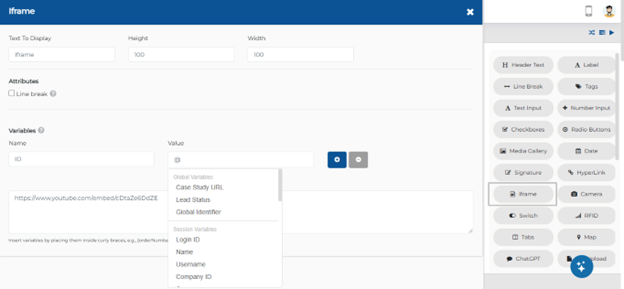
Choose the Iframe component from the component section and add it to the dashboard or page where you need it.
If you're linking to a video or any dynamic content, you can now specify variables within the Iframe, such as user attributes or session variables.
Map these dynamic parameters to the Iframe. For example, pass the user’s unique ID, session parameters, or any other variable required to load the content correctly.
Customize the URL or content source in the Iframe based on the user attributes or variables you've defined by using curly braces {}.
This makes the Iframe content load dynamically, offering a personalized experience for each user.
Admins Can Manage BA Users
With this release, admins can now create and manage BA (Business Analyst) users directly to streamline the process.
How to add BA User
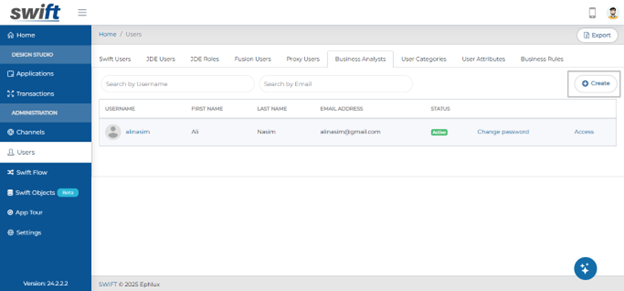
Log in as an admin user.
Navigate to the Users section.
You will now see a create option.
Admins can directly create a new BA user or update the details of existing ones as needed.
This update simplifies the management of BA users by providing greater autonomy to admins, allowing them to create, update, and maintain the list of BA users within the system.
Revamped Entry Form Designer
The Entry Form Designer now features a modern, circular background style, giving forms a more cohesive and sleek appearance across all screens. This design update enhances both the form’s aesthetics and user experience.
Wrapping Up
This release brings a host of exciting enhancements aimed at improving user experience, streamlining workflows, and offering greater customization. With features like Sticky Notes for better organization, Dynamic Iframe Integration for personalized content, and the ability for admins to manage BA users directly, this update is designed to make automation more efficient, intuitive, and enjoyable.
Let’s keep optimizing, innovating, and succeeding together!
Thank you for being a part of the Swift community. Here's to optimizing your processes and achieving success!
With 💙 from Swift
Your feedback is essential in driving us forward, so please don't hesitate to share your thoughts with us; and stay tuned for more groundbreaking features as we evolve!